
Left photo + right photo + motion video
Give Your Character a Hotel Lobby AI Moment
Put a playful character at the centre of a performance idea. Use an image and your own motion reference to explore the orange-studio look, then shape the result into a short Hotel Lobby AI story.
Create my character momentUpload both performer photos, generate a scene image with GPT Image 2, and review it before creating your video with Seedance 2.0. The scene image and video have separate credit quotes.
Classic Hotel Lobby Duo
Two performers, a suspended microphone and a simple orange backdrop.
Hotel Lobby AI playful style references
Explore collected duo performances from classic studio looks to illustrated characters and animal companions. Pick a visual direction for your story without assuming the same action or identity will appear in your output.
Classic Hotel Lobby Duo
Two performers, a suspended microphone and a simple orange backdrop.
Grandma Rap Duo
Contrasting outfits and an energetic performance in the same studio setup.
Pet & Baby Duo
A playful pairing with a clear gap between the two subjects.
Halloween Costume Duo
Costume silhouettes make the left and right performers easy to distinguish.
Anime Duo
Illustrated characters bring a different visual treatment to the duo format.
Grandma & Grandson Duo
An intergenerational pairing uses matching staging and contrasting identities.
Animal Sidekick Duo
A character and an animal sidekick share a readable performance space.
Orange Studio Duo
A studio performance with a suspended microphone and a warm orange backdrop.
Choose a character pairing
These stills help you compare playful contrasts while keeping the scene, lighting and microphone placement simple.
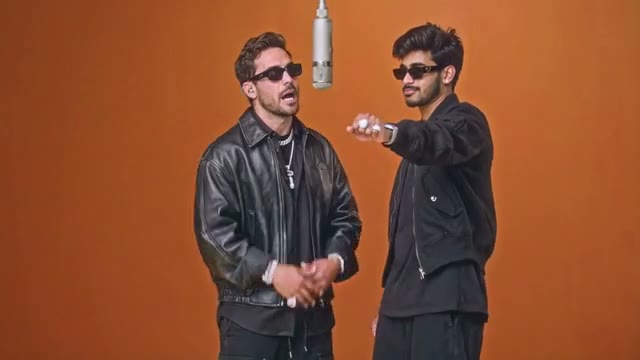
Classic Hotel Lobby Duo
Two performers, a suspended microphone and a simple orange backdrop.
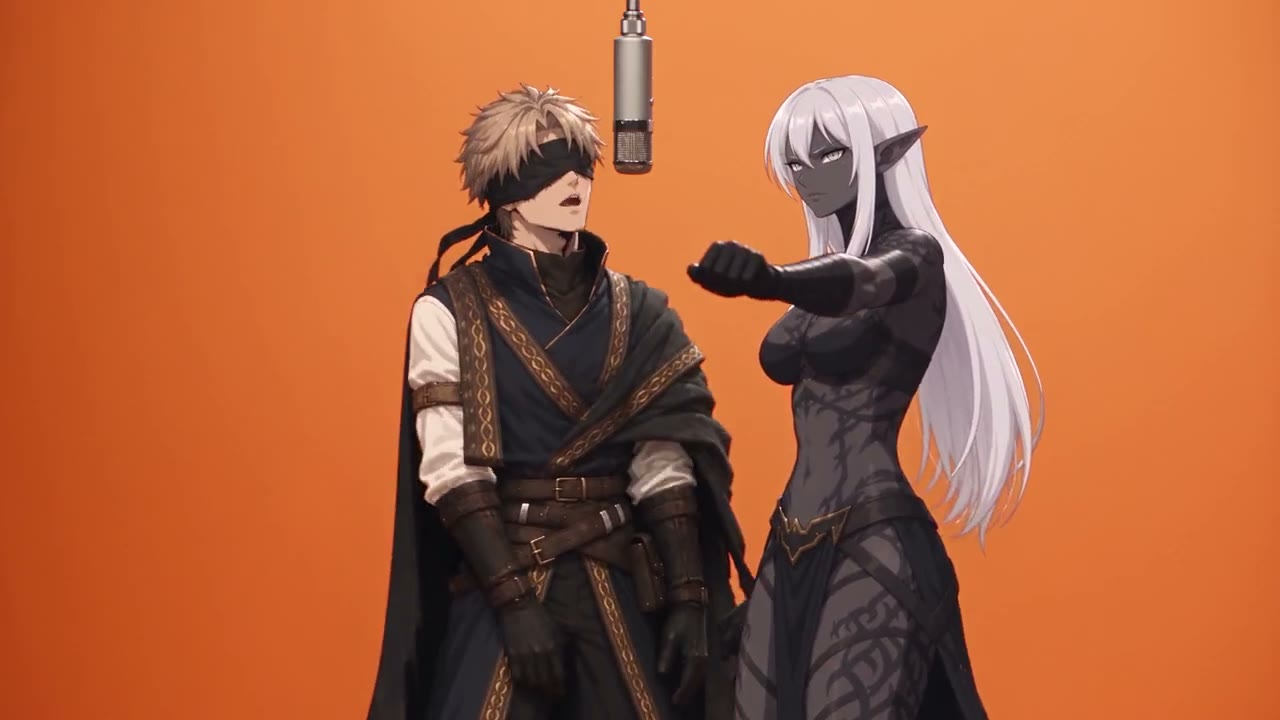
Anime Duo
Illustrated characters bring a different visual treatment to the duo format.
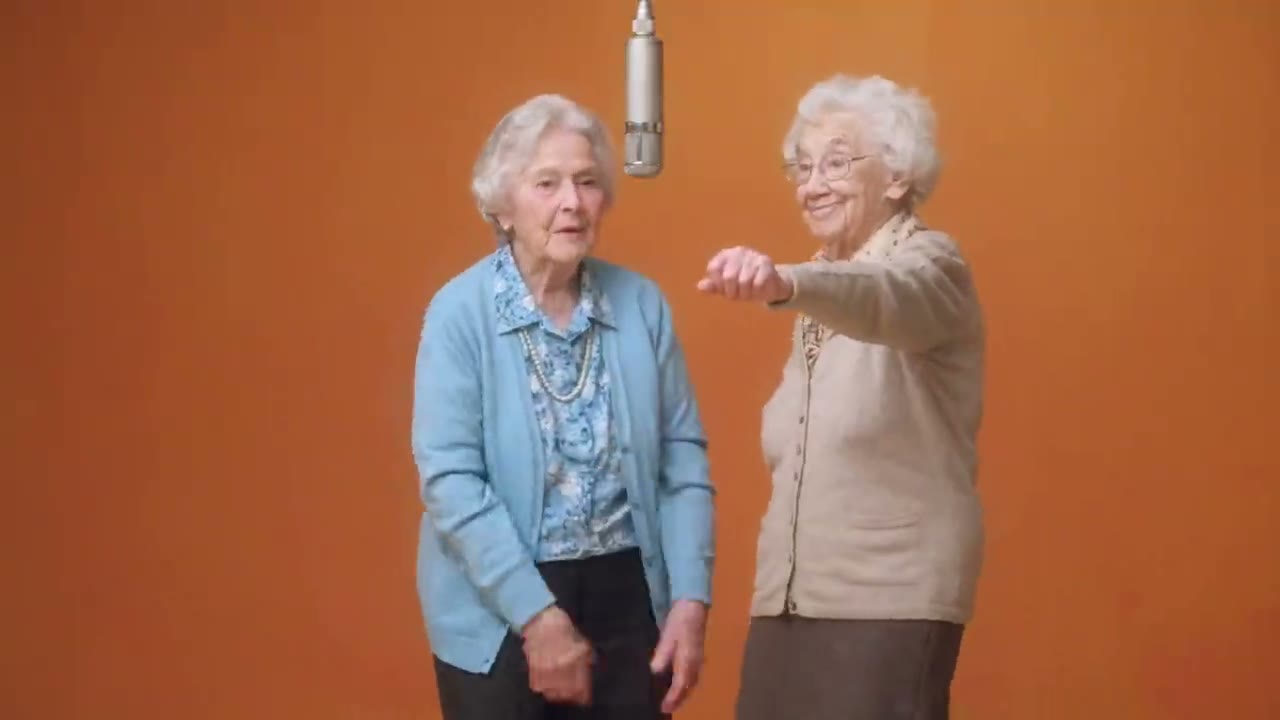
Grandma Rap Duo
Contrasting outfits and an energetic performance in the same studio setup.
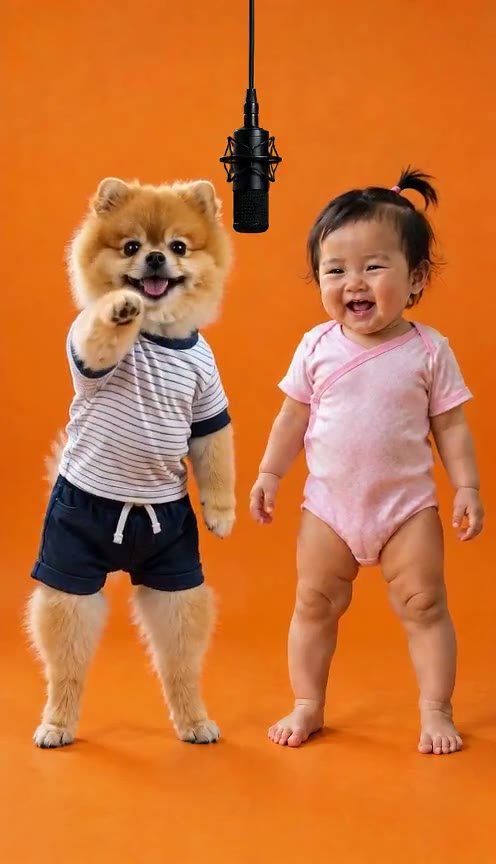
Pet & Baby Duo
A playful pairing with a clear gap between the two subjects.
Make a Hotel Lobby AI video with your own performance
Upload both performer portraits and generate a shared orange-studio scene with GPT Image 2. Review the rendered scene before submitting to Seedance 2.0. Both original portraits, the scene image and the motion reference video are supplied together. Identity and scene references guide the result; exact likeness and choreography are not guaranteed.
How to create your Hotel Lobby video
1. Bring a movement with personality
Upload an MP4 or MOV reference, 3–15 seconds and up to 32 MB. A visible nod, wave or lean is easier to assess than a fast routine with crossed limbs. Use a performance you are authorized to process.
2. Pair the left and right characters
Upload separate left and right performer photos, then select Generate scene image. GPT Image 2 renders the shared studio scene for review. Seedance 2.0 receives both original portraits, the scene image and the selected reference video. Review both faces and the scene before generating; likeness and motion fidelity can vary.
3. Check the quote and watch the whole clip
Review the settings and displayed credits before you generate. Watch for changes in the face, costume and limbs during each gesture. Open the completed result in history and download it when you are ready to make the final edit.
Choose a character idea that fits the movement
The best starting point is a readable relationship between the character and its action.
A mascot with a simple silhouette
Choose a character whose head, torso and hands are clearly separated. Small accessories and overlapping shapes can make continuity harder to inspect. A bold costume colour gives the orange studio a useful contrast without requiring a complicated background.
An illustrated performer with a clear pose
Use a front-facing or gently angled image that exposes the parts needed for the action. Avoid asking a cropped portrait to explain a full-body routine. Stylized characters still need a reference with compatible framing and readable movement.
Make the Hotel Lobby moment tell a small story
A short performance can have a setup and response without a crowded frame.
Let one gesture carry the joke
Try a confident nod, an exaggerated pause or a modest wave toward the microphone. Choose the reference for that exact beat. Keep the prompt focused on appearance and setting rather than adding several actions that contradict the uploaded clip.
Build the response in a separate shot
If a second character completes the idea, generate it separately and cut between the performances. Give each a contrasting outfit and similar studio description. Two-person face replacement from two photos is not a control offered on this page.
Review the character before sharing
Playful styling does not remove the need to inspect what the model produces.
Watch the anatomy during motion
Check ears, paws, hands and costume edges when they cross the body. A pet or mascot may not map neatly to a human performance. Start with less demanding motion and use the whole result to decide whether the idea works.
Finish the sound and pacing
Music and synchronized lyrics are not promised. Add an authorized soundtrack and trim the clip in your editor if needed. Review the caption placement and final crop on a phone so the character's key gesture remains visible.
Hotel Lobby AI prompt ideas
Suggested prompts describe the intended look. They are not generated examples or guarantees of the result; motion still comes from the reference video.
A two-performer studio brief
Two original performers side by side in a minimal orange studio, clearly visible faces and shoulders, contrasting jackets, a suspended microphone between them, soft frontal lighting and a steady camera, movement guided by the uploaded performance reference.
An illustrated performer
An original cartoon performer with a distinct silhouette in a clean orange recording booth, consistent outfit and facial features, readable expressive gesture from the reference video, stable camera and simple background.
Hotel Lobby AI questions for character creators
How do collected references relate to this generator?
Collected references illustrate the Hotel Lobby performance idea. Prepare your own permitted images and motion reference, then review the actual model and credit quote. Choosing a reference changes the preview; it does not import a preset or promise artist endorsement.
How do collected references relate to this generator?
Upload separate left and right performer photos, then select Generate scene image. GPT Image 2 renders the shared studio scene for review. Seedance 2.0 receives both original portraits, the scene image and the selected reference video. Review both faces and the scene before generating; likeness and motion fidelity can vary.
Can I try Hotel Lobby AI free?
You can browse the guide without paying. Generating a video requires a supported model and sufficient credits. Check your current balance and the displayed estimate; any account promotion may have limits and may not cover your chosen render.
Can I use a character image prepared elsewhere?
You can prepare a character image in an image editor, then upload it in a supported format. Use a clear image you have permission to process; project files and editor settings are not imported.
Can a writing assistant help plan the performance?
A writing assistant can help organize a shot brief. Video rendering uses the selected model and its current credit quote; written planning does not provide a video preset or a separate generation integration.
Why do ears or hands change shape?
A difficult pose or mismatched anatomy can confuse the motion transfer. Use an image that exposes the needed features and a simpler reference with fewer occlusions. Do not expect a more detailed prompt to guarantee anatomically correct movement.
Can I use a friend's photo?
Use images and references you are authorized to upload and process, including permission from the person shown where needed. Review the result before sharing, and choose music you are allowed to publish.
Can I make a duo from two uploaded photos?
Upload both performer portraits and generate a shared orange-studio scene with GPT Image 2. Review the rendered scene before submitting to Seedance 2.0. Both original portraits, the scene image and the motion reference video are supplied together. Identity and scene references guide the result; exact likeness and choreography are not guaranteed.
Can I request a refund for my purchase?
You can request a refund within 10 days of purchase if you have unused credits from that purchase and provide a clear reason, subject to our Refund Policy. If eligible, an unused purchase can be fully refunded; a partly used purchase is refunded in proportion to its remaining unused credits. Fully used purchases and free or promotional credits are not refundable.
Do credits expire or carry over?
Credit validity depends on the pack, subscription or promotion that issued them. Review the purchase terms and expiration dates in Settings > Credits. A renewal or new purchase does not extend older credits. Use credits before their stated expiration; do not assume unused subscription credits roll over indefinitely.
What happens to credits if generation fails?
Credits charged for a task that is confirmed as failed due to a system error are returned automatically. A task that is still processing has not yet been confirmed as failed. Check its status and your credit history before submitting again. If a confirmed failure still shows an unresolved charge, email support@heydots.app with the task ID.
Can I get credits back if I do not like the result?
AI results can vary, so a completed result that differs from your expectations is not automatically treated as a technical failure. Eligible completed image tasks can be submitted for credit refund review using the refund option where available; approval is required. For a video or another issue, contact support@heydots.app with the task ID and details. A credit refund returns credits, not money to your payment method.
How can I get help with billing or a generation?
Email support@heydots.app. For billing, include your account email and order ID; for generation, include the task ID, issue description and relevant screenshots. If you purchased as a guest, keep the original browser data and payment receipt so we can help locate the purchase.
Plan your next performance
Give one character one clear performance beat. When the gesture, face and costume stay readable through the shot, decide how to edit it into the story you want to share.
Create my character momentheydots.app · Updated
See update history
- — Added an action to restore the existing example prompt without starting a generation.
- — Updated page copy and content.
- — Page content published.